Cover Feature Guide
Introduction
If you like a song’s melody but want different lyrics, vocals, or musical style, the Cover feature in MusicArt is designed for that purpose.
It allows partial updates so you can modify specific elements without rebuilding the entire track.
Choose the song to cover
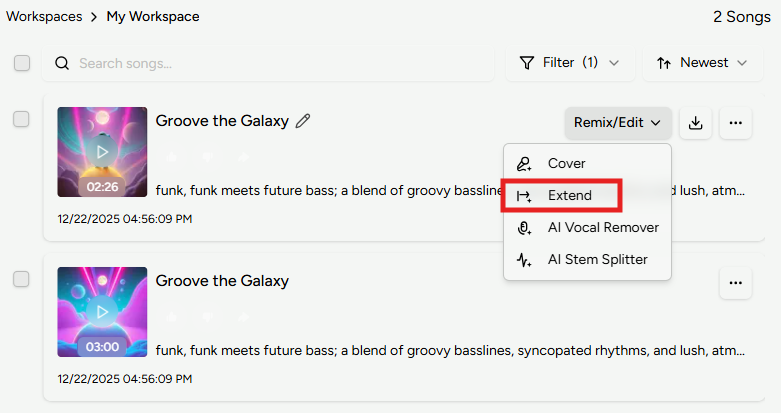
Open the AI Music Generator and select the song you want to modify from the workspace panel.
Switch to the Cover view to configure how the new version will be generated.
Customize your cover
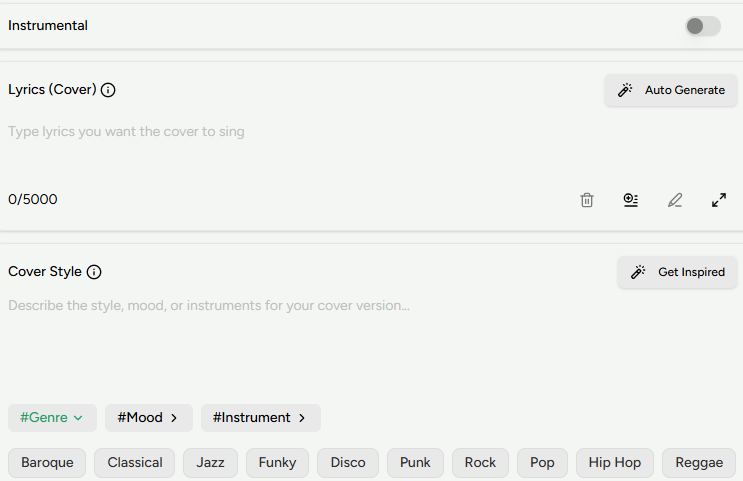
Use the Instrumental option to decide whether vocals should be included.
In the Lyrics field, enter new lyrics or paste the original lyrics if you want them unchanged.
In the Cover Style field, describe the desired sound. To preserve the original feel, you can write “Keep the original style”.
Fine-tune with advanced options
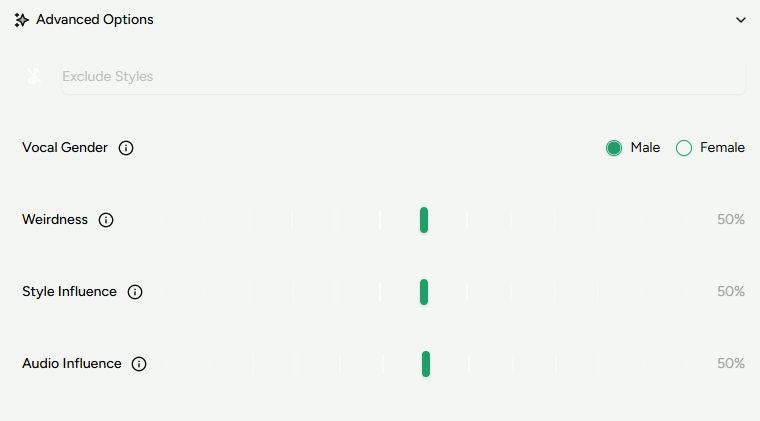
Open Advanced options to access additional controls:
- Exclude Styles: Styles you want to avoid
- Vocal Gender: Vocal type for the new version
- Weirdness: Controls creative variation
- Style Influence: Strength of style guidance
- Audio Influence: Similarity to the original audio
Click Generate and wait for MusicArt to create the updated version of your song.