Extend Feature Walkthrough
Introduction
The Extend feature on MusicArt allows you to lengthen a song by adding new sections without recreating the entire track.
It keeps your original audio intact while giving the AI freedom to generate fresh musical ideas that match your song.
Choose the song to extend
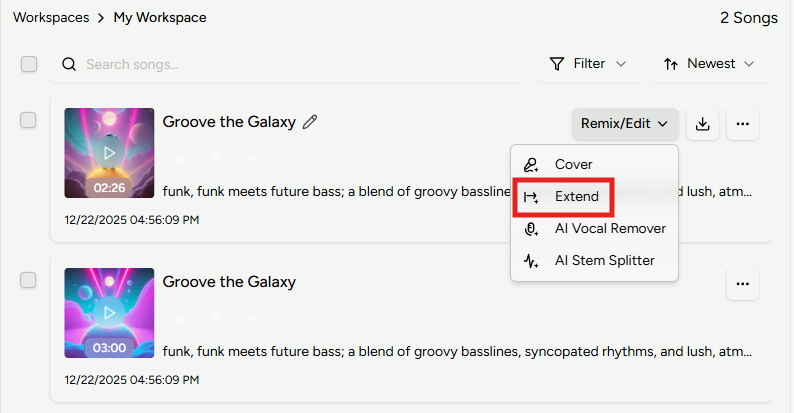
Open the AI Music Generator and select the song you want to extend from the workspace panel on the right.
This opens the Extend view where you control how the new section is created.
Set where the extension starts
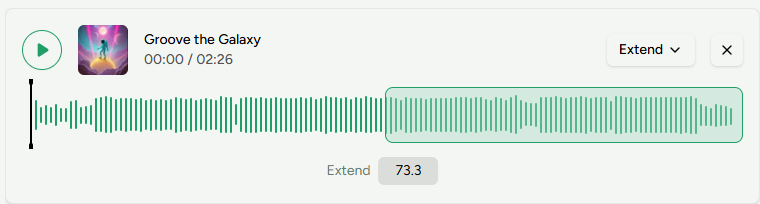
Use the timeline slider or enter a precise timestamp to decide where the extension begins.
MusicArt preserves everything before that point and starts composing new music from your selected position.
Customize the extended section
Use the Instrumental option to decide whether the new section includes vocals or remains instrumental.
In the Extend Style field, describe the sound you want for the added part, such as genre, mood, instruments, or atmosphere.
Fine-tune with advanced options
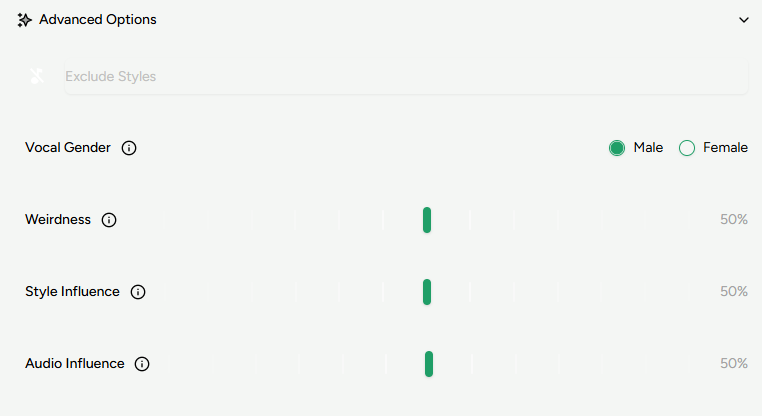
Open Advanced options to access deeper controls:
- Exclude Styles: Styles you want to avoid
- Vocal Gender: Vocal type for the extension
- Weirdness: Controls how experimental the new section becomes
- Style Influence: How strongly the style description guides generation
- Audio Influence: How closely the extension follows the original audio
When ready, click Generate and wait for the AI to create the extended section.