Late Shift Slow Jam
3:18- Drums
- Finger snaps on two and four, soft swung hi hats
- Keys
- Warm Rhodes chords
- Bass
- Deep sub bass
- Made for
- Singing over, with room in the middle
The best beat maker for PC is the one you can open right now. The MusicArt AI Beat Generator runs in your browser on Windows, reads a sentence about genre, tempo and drums, and returns two full instrumental beats to sing, rap or edit over.
Open the AI Beat Generator
Each beat below came from one typed sentence in the AI Beat Generator, made on a Windows PC with Instrumental Only on. Late Shift Slow Jam is an R&B bed with space left for a singer. Neon Overlay is a synthwave track built to sit under a video or stream. A short prompt and two full takes is what the best beat maker for PC should hand you.

A lot of people searching for the best beat maker for PC can sing or write but do not have a beat, and do not know the tempo their song needs. These four checks matter more than a long feature list.
It runs in Chrome, Edge or Firefox on Windows, and the same page works on a laptop, tablet or phone. There is nothing to install and no plugin folder to manage.
Write 72 BPM or 140 BPM in the prompt and the drums, bass and chords come back locked together, so you never tap a tempo or nudge a kick by hand.
Each run returns two full beats. If one kick feels too rough or the mood is flat, you can change a few words and hear two more.
The beat starts from your own sentence, so you are not borrowing a tagged type beat when you want to sing, rap or jam on something.
The most common complaint about a new beat is the drums. The kick is too rough, a second drum part steps on the vocal, or the whole thing has no feeling. With the best beat maker for PC you fix that in words, not by dragging notes. Find what you hear on the left and add the words on the right to your next prompt.
The kick sounds too rough
soft round kick, warm low end
The drums crowd your voice
sparse drums, room in the middle for a vocal
A second drum part takes over
same drum pattern all the way through
It feels flat, with no emotion
late night, bittersweet, warm Rhodes chords
The hi hats feel stiff
swung hi hats, laid back groove
It is too slow to rap on
140 BPM with half time drums
A beat is the start, not the end. Once the best beat maker for PC gives you a take you like, it moves into whatever you already use on that computer.
Save the beat, load it into your recording program and sing or rap over it with a USB mic.
Set the project to the BPM from your prompt so any part you add lines up with the beat.
Drop the instrumental under a gameplay clip, vlog or stream intro in your video editor.
Want a voice on the track? Take the same idea to the AI Rap Generator or the AI Music Generator.
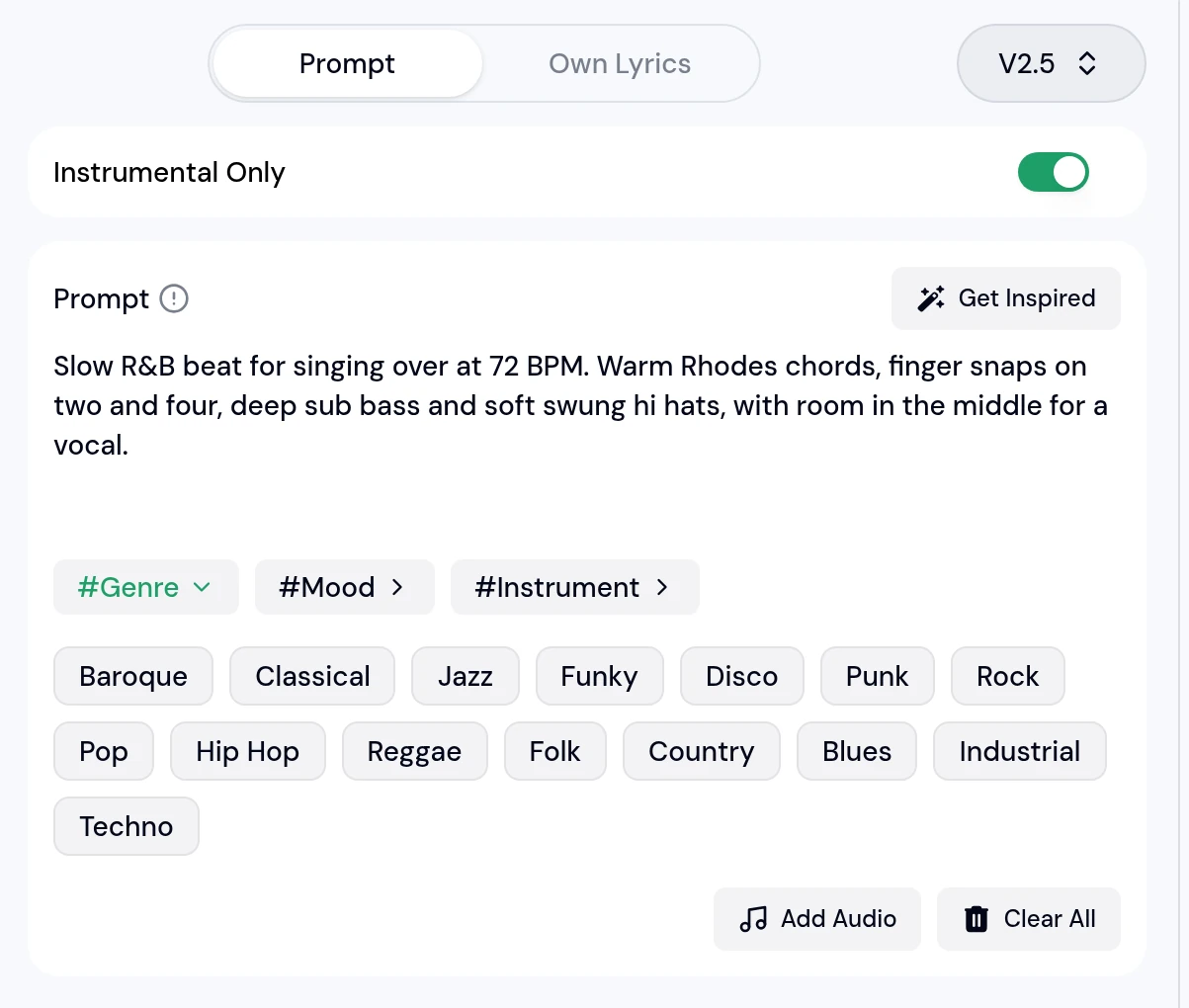
This is the prompt behind Late Shift Slow Jam. The same five steps work for any beat you type into the AI Beat Generator.
No. The AI Beat Generator runs in the browser, so it works on a Windows desktop or laptop as it is, and the same page opens on a Mac, tablet or phone.
Yes. Write the number in the prompt, such as 72 BPM for a slow jam or 140 BPM for trap, and the drums, bass and chords follow that tempo.
No. You describe the beat in words and it is generated for you. If you want to edit single notes, bring the finished beat into your DAW and work on top of it there.
Turn Instrumental Only off and name the voice in the prompt, or take the idea to the AI Rap Generator or the AI Music Generator for full songs with words.
Anything you can describe, from R&B and synthwave to hip hop, techno, reggae or country. The #Genre, #Mood and #Instrument chips under the prompt help when you are not sure what to write.
Type one sentence about the beat in your head, hear two takes, and keep the one that makes you want to start writing.
Generate Music for Free Now