Rap verse
Corner Store Cypher
Instrumental boom bap hip hop beat, 90 BPM, dusty chopped piano loop, punchy kick and crackly snare, deep upright bass, vinyl crackle, open space in the mids for a rapper, no vocals
0:00 / 1:57
Make a beat to rap or sing over from one sentence on your phone. The best beat maker app for Android here runs in Chrome, needs no pads or timeline and gives you two instrumental beats to play and download.
Make a BeatBoth beats are from the best beat maker app for Android, each from one short prompt with Instrumental Only on. One is for a rap verse, one for a sung hook. One version of each.
Instrumental boom bap hip hop beat, 90 BPM, dusty chopped piano loop, punchy kick and crackly snare, deep upright bass, vinyl crackle, open space in the mids for a rapper, no vocals
Instrumental afrobeats groove, 104 BPM, bouncy log drum, shakers and rim clicks, clean palm muted guitar plucks, warm pads, simple loop with room for a sung hook, no vocals
One beginner wrote "I don't have a computer, so computer programs are kind of out of the question". Another said of mobile studios "I think biggest problem is the screen size". The best beat maker app for Android on this page is built around those two limits.
Open the page in Chrome on Android. Nothing to install and no desktop to borrow.
A prompt box, genre, mood and instrument tags and one switch. No tracks or grids to zoom into.
Two full instrumental beats per prompt that you can play, save to My Music and download.
Android producers often point to "a huge audio latency problem on Android that is caused by the OS". When every pad hit lands late, the groove falls apart.
The best beat maker app for Android here does not ask you to play anything. You describe the drums, the tempo and the sounds, and the beat is generated with the timing already locked.
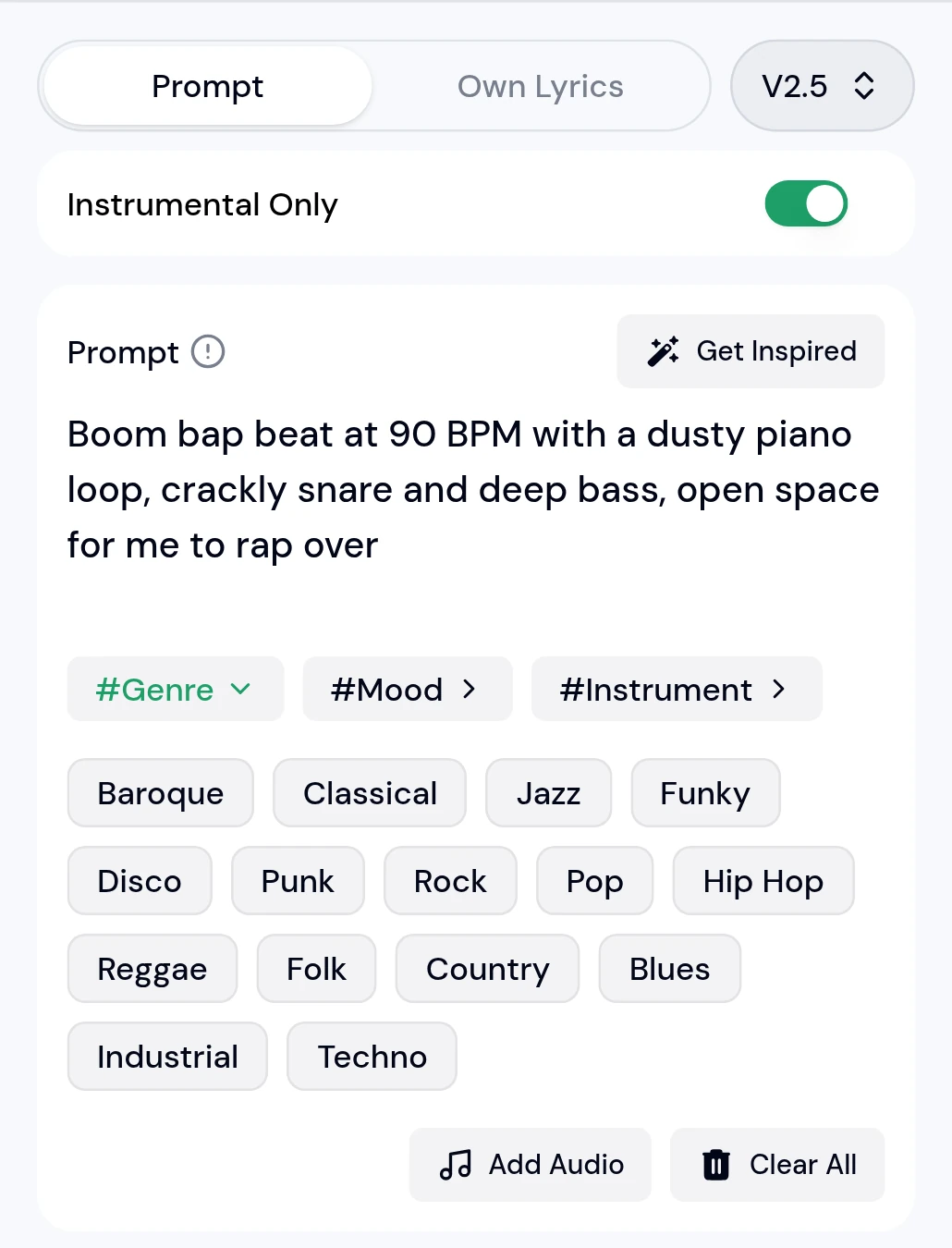
A user of a simple phone app called it "way too restrictive I couldn't put beats and sounds wherever I wanted". With the best beat maker app for Android you steer by words and regenerate. You cannot place single hits on a grid.
90 BPM
A laid back head nod tempo for verses
crackly snare and vinyl crackle
A dusty boom bap drum sound
open space in the mids
A sparser loop that leaves room for a voice
bouncy log drum and shakers
An afrobeats bounce for a sung hook
Most beats made on a phone end up under a voice. Hum a hook over the Late Bus Hook beat on the way home, or write a verse for Corner Store Cypher.
If the words are the hard part, the AI Rap Generator writes verses and hooks from a topic. Pair them with the beat from the best beat maker app for Android and you have a full demo idea.
No. Open the Music Beat Maker in Chrome or another phone browser and use it there. Your beats stay in My Music on the same account.
Not on this page. One rapper said the default recorder "doesent let me play my beat that I made". Download the beat, play it in a recording app that supports a backing track and use wired headphones so the beat does not bleed or lag.
Write the tempo in the prompt, for example 90 BPM for boom bap or 140 BPM for trap. The result follows it closely, and you can generate again if it drifts.
Not when Instrumental Only is on. Leave it on for beats you plan to rap or sing over.
Play both results, then download the one you want as MP3, WAV or FLAC from the result card.
Yes. The AI Rap Generator writes verses and hooks from a topic, and you can rap them over your beat.
One sentence and Instrumental Only are all a first beat needs.
Make a Beat